Documentation
Getting Started
Installation and Access
Network Configuration
Verification and Maintenance
Choosing an Access Mode: Bridge, Secondary Router, or Bypass Router
Choose the mode first, then wire. The three modes wire differently, and mixing them never works. Choosing takes three minutes.
Decide in three minutes
| Site situation | Use |
|---|---|
| The modem can be switched to bridge mode and you have the broadband account and password | Bridge mode |
| The modem is in router mode and is hard to change | Secondary router mode |
| A router or switch already exists and the structure must not change | Bypass router mode |
| Not sure | Try bridge first. If the modem cannot be changed, fall back to secondary router |
Where each mode sits, and what it costs
Bridge mode (the gateway dials up)
Where the gateway sits: the gateway WAN port connects to the modem LAN port, and the gateway dials up. Benefit: the simplest link, the most stable, and the highest networking success rate. Cost: the modem must be switched to bridge mode, and the broadband account and password are required. Best for: sites where you can open the modem admin page and obtain the broadband account.
Secondary router mode (the gateway sits behind the modem)
Where the gateway sits: the gateway WAN port connects to the modem LAN port, and the gateway goes online as a secondary router. Benefit: the modem stays unchanged; configure it as soon as it is wired. Cost: one more layer of NAT; the gateway LAN port needs its own subnet. Best for: sites where the modem cannot be changed but one more device can be added.
Bypass router mode (the gateway connects alongside)
Where the gateway sits: the gateway LAN port connects to a LAN port of the existing router or switch. Benefit: the existing network structure is untouched, which the customer accepts most easily. Cost: DHCP must be disabled, and terminals must be pointed at the gateway. Best for: sites where the existing network must not be changed.
Comparing the three modes
| Item | Bridge | Secondary router | Bypass router |
|---|---|---|---|
| Recommendation | Most recommended | Common | Flexible |
| Broadband account needed | Yes | No | No |
| Change the modem | Yes, switch to bridge | No | No |
| Change the existing network | Yes | No, but use a separate subnet | No, but disable DHCP |
| Wiring | WAN port to modem LAN port | WAN port to modem LAN port | LAN port to switch LAN port |
| Typical problem | Wrong broadband account, or the modem was not really switched to bridge | LAN port on the same subnet as the modem | Terminal gateway does not point at the gateway |
Wiring diagram
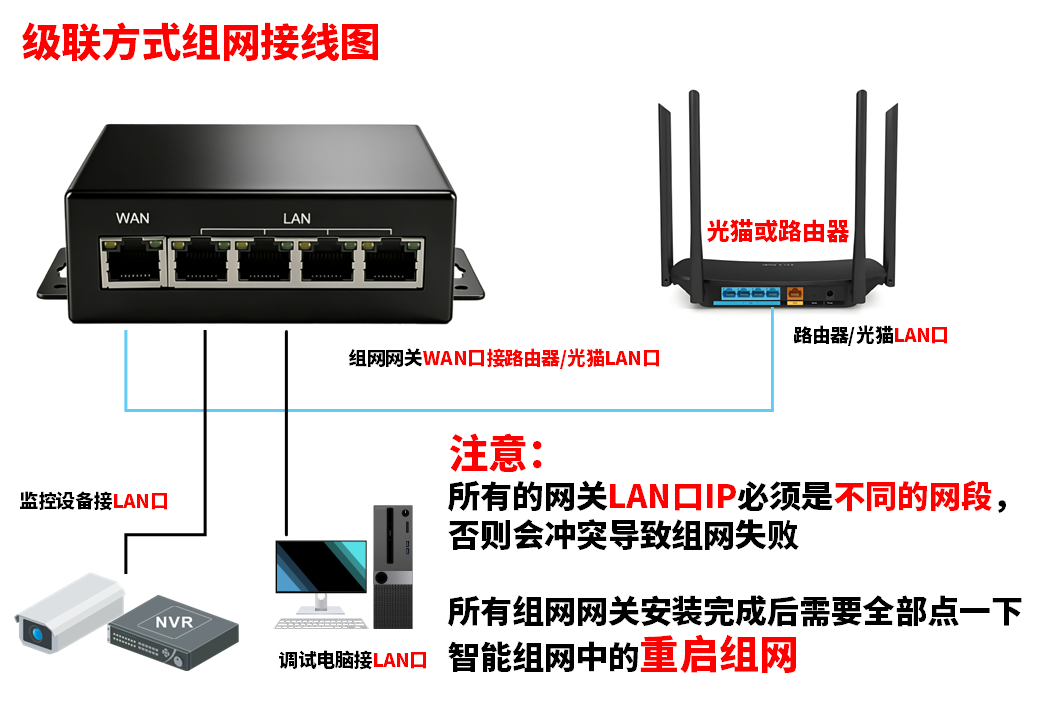
Figure: wiring for bridge and secondary router modes; the cable runs from the gateway WAN port to the modem LAN port.
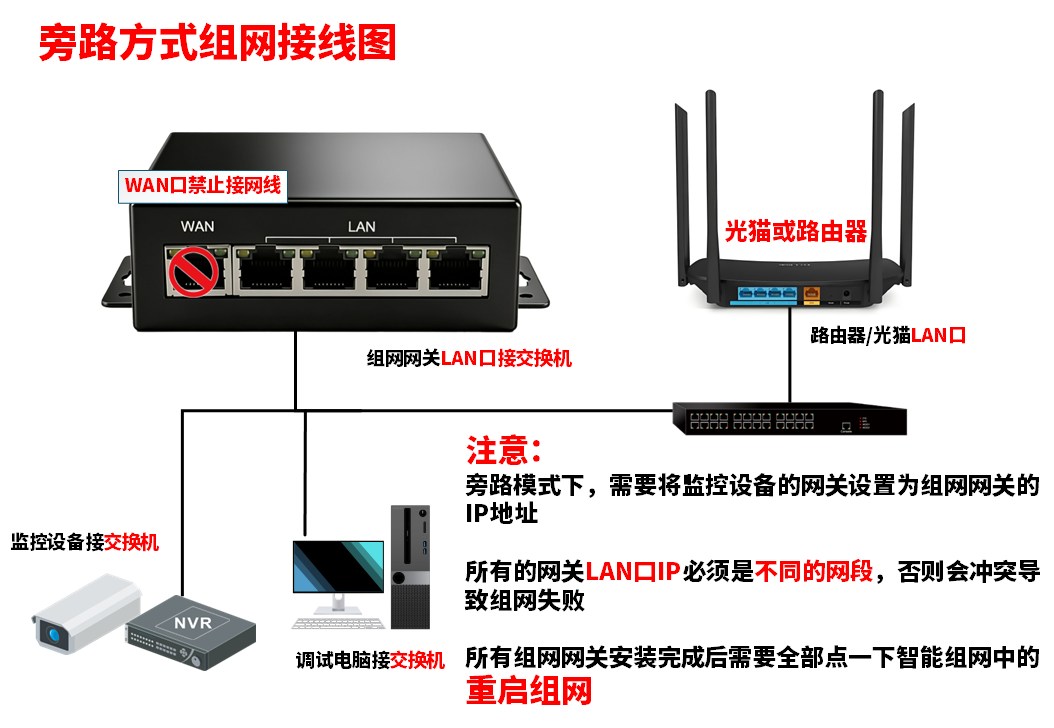
Figure: wiring for bypass router mode; the cable runs from the gateway LAN port to a LAN port of the existing router or switch.
After this page, open only the mode page you chose. If you follow all three, later configuration overwrites earlier configuration.
Choose bridge if you can change the modem. Choose secondary router if you cannot. Choose bypass router if the customer will not allow the structure to change.
Was this page helpful?A one-line note helps us make these steps more accurate.