Documentation
Getting Started
Installation and Access
Network Configuration
Verification and Maintenance
Admin Page Unreachable, No Internet After Configuration
Two of the most common problems: you cannot get into the admin page, or there is no internet after configuration.
Work through the items one by one; the item you cannot tick is the problem.
A. The browser cannot open 192.168.10.1
- The address includes
https://; the full address ishttps://192.168.10.1 - The computer IP is on the
192.168.10.xsubnet, mask255.255.255.0 - The cable is plugged into a gateway LAN port, and that port light is on
- The computer firewall and antivirus are not blocking it
- You have already clicked through the certificate warning page
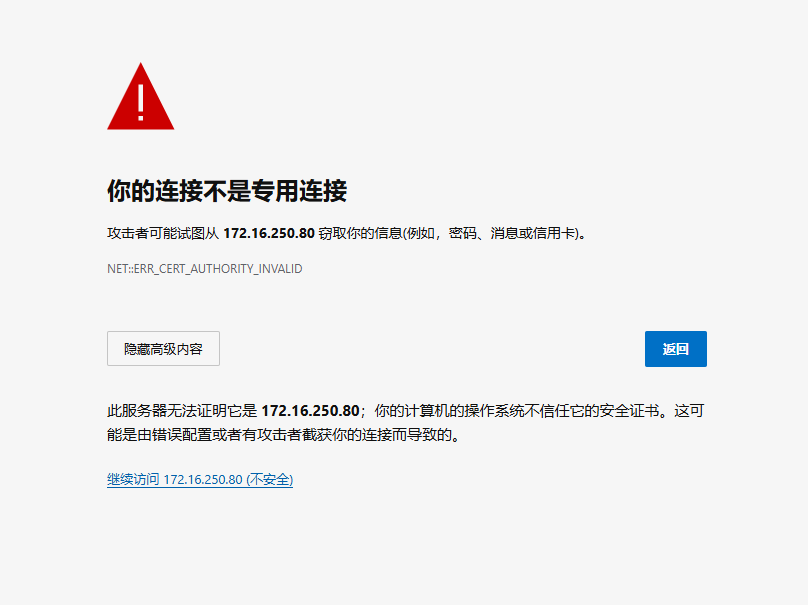
The certificate warning does not mean an infection.
The device uses a self-signed certificate; click Advanced → Proceed.
B. No internet after configuration
| Access Mode | Check first | Common mistake |
|---|---|---|
| 桥接模式(Bridge Mode) | The broadband account and password; whether the optical modem really is bridged | The optical modem is still in router mode |
| 二级路由模式(Secondary Router Mode) | Whether the LAN port is on the same subnet as the upstream | The optical modem is 192.168.1.1, and the gateway LAN port also uses 192.168.1.1 |
| 旁路由模式(Bypass Router Mode) | Whether the LAN port IP conflicts; the gateway field; whether DHCP is off | DHCP left on, competing with the upstream router |
| All three | Whether the WAN protocol matches the access mode | Bridge Mode chosen but the DHCP client protocol selected |
A wrong LAN port IP locks you out of the admin page
Recover in this order:
- Try the old address first.
- Move the computer to the old subnet, then the new one, and try each.
- Only then do a factory reset.
What you should see when done
- The login page at
https://192.168.10.1opens. - Computers below the gateway can open external web pages.
It looks broken, but it is a configuration mistake
| Symptom | What it actually is |
|---|---|
| The login page does not open | https:// is missing |
| A certificate warning | A self-signed certificate; this is normal |
| Secondary Router Mode connects but web pages do not open | The LAN port is on the same subnet as the upstream |
| The bypass router drops out randomly | DHCP is still on |
| The platform shows online but the sites cannot reach each other | The subnet proxy is not configured |
Next → The platform does not show the device, or sites cannot reach each other
Was this page helpful?A one-line note helps us make these steps more accurate.